
Insights
valantic Viewpoints
Current trends and technologies, analyzed from different perspectives.
Learn moreOur capabilities bring vision to life, blending strategy, creativity and technology to turn ideas into real impact.

Your market environment has a decisive impact on your digital challenges. We understand your unique needs and develop solutions that deliver real impact.
From studies and blogs to webinars, podcasts, and exclusive events – discover ideas, trends, and expert knowledge for your digital future.

With in-depth know-how, clear values, and a vibrant corporate culture, we shape digital transformations that make a real impact.

Are you looking for a professional environment with challenging digital projects for renowned clients? You're in the right place.
This document describes in short most of the new features that are included in x-gen release 4.15. For more comprehensive explanations and the list of bug fixes, please refer to the Release Notes.

Operating Systems
Databases
Vulnerability Reports
3rd party libraries used in x-gen are regularly monitored for vulnerabilities based on CVE. valantic FSA analyses the vulnerabilities found and provides patches for supported x-gen versions as necessary.
Vulnerability reports are created for all supported x-gen versions; they can be provided to
customers on request.
IBM MQ 9.3.x is newly supported.
Java: Upgrade to JRE 11.
OpenSSL: Upgrade to 3.0
Git Client
Among others, there are the following improvements in relation to Git:
Tracing
The XRD now offers to load trace files of name pattern *.xtl, e.g. “Traces.BCK02022023.xtl”. In connection with the new download options in XWA (see below), the feature simplifies tracing in container environments. In addition, these trace files can be deleted.
Enhancement of “Environments”
The existing “Environment” concept allows to set different sets of configurations for different environments in flows. So far, environments were always bound to a runtime profile. Now it is possible to define environments independent of runtime profiles, and the environment to be used can be set in a profile. This allows two or more different configurations in flow objects in the same flow independent of profiles.
Mapping Editor
A new “Shield mode” allows to temporarily switch off hierarchy validations in output fields. This is useful when several connections are changed. When the changes are done and the “Shield mode” is turned off, the hierarchies are validated again.
Easy Replacement of Elements With Successors
When there’s a successor of an element available, there’s now a context menu item to replace the element with its successor. This applies to operators in mappings, flow objects in flows and message definition references in message definitions. Configurations are transferred to the successor as far as possible, however, the configurations should be checked in the successor.
Message Definition Editor / Dictionary Editor
The “History” tab was removed from the Message Definition and Dictionary Editors. When opening a message definition or dictionary with a history, the user is asked to move the history to the description.
New XSD Import
The creation of message definitions based on XML Schema Definitions has been completely reworked (see also “Command Line Tools” below). In this context, the respective dialog has been slightly changed.
The x-gen Development Environment (XDE) is x-gen’s web-based successor of the XRD. XDE is a fully compatible alternative to using XRD with – for the time being – a limited number of editors available. Once all functionalities will be available in a future X Gen release, it will replace the XRD.
The XDE was launched in x-gen 4.14 with the Workspace Explorer, the Item Explorer and the Mapping Editor for all types of mappings. The look and feel is similar to what is known from XRD, however, there are several new usability features but also (yet) a few restrictions.
The web frontend, running in a browser, connects to a new XDE server process. The XDE server process has access to the workspace in the file system, and it provides services, such as reading and writing x-gen documents, to the frontend. In addition, the XDE server maintains locks of open x-gen documents from XDE and XRD to avoid opening the same document for writing in both applications. This way, XDE and XRD can be safely used simultaneously with the same workspace.
The new XDE features in x-gen 4.15 are:
General
The new system privilege xgen:xde_development is required to log in to XDE. The initial setup of x-gen 4.15 comes with a new role “Developer” containing that privilege, and with the user “appdev” containing that role.
Workspace Operations
Improvements of Mapping Editor
Message Definition Editor
In the new Message Definition Editor, it is possible to manually add, remove and change fields and groups as well as their attributes. Undo and Redo are available, alike cut/copy/paste or drag & drop of elements. Here’s an example:
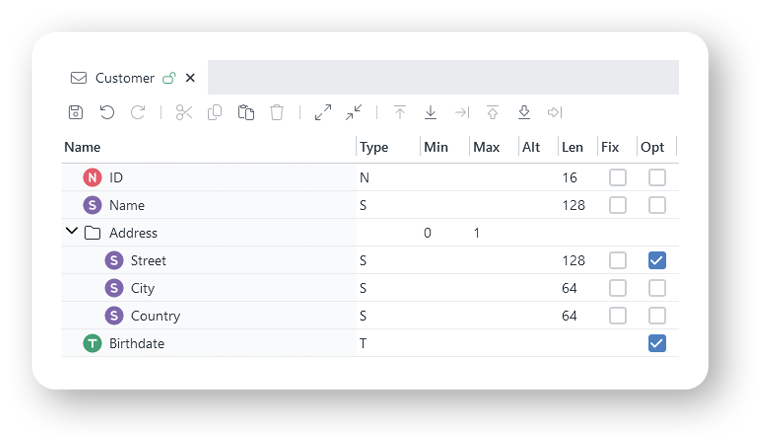
References to other message definitions or to dictionaries can be added by drag & drop from the Item Explorer.
Features beyond or different from XRD:
Restrictions:
Operator Definition Editor
The new Operator Definition Editor allows to create both meta operators and operators based on Tcl, C++ or Java.
Compared to XRD, an operator definition is opened in a new tab as any other document. All relevant information is visible in one screen:
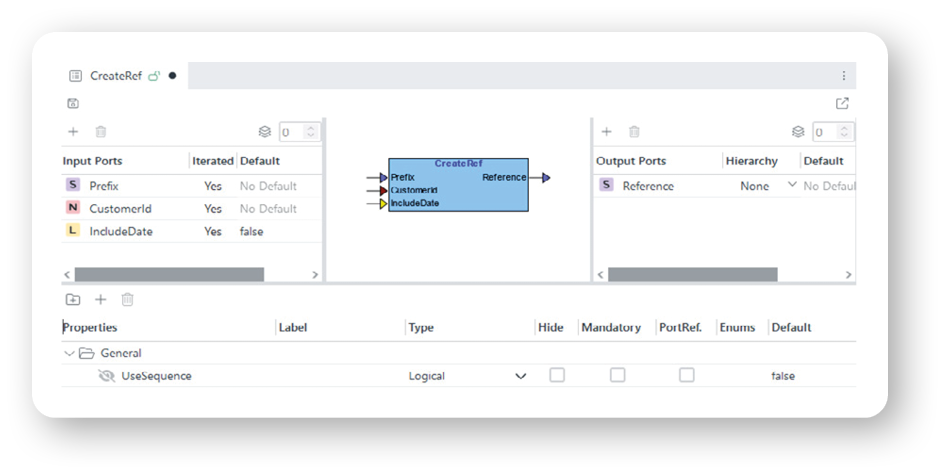
For Tcl operators, the Tcl code can be edited on the same screen as well.
Git Integration
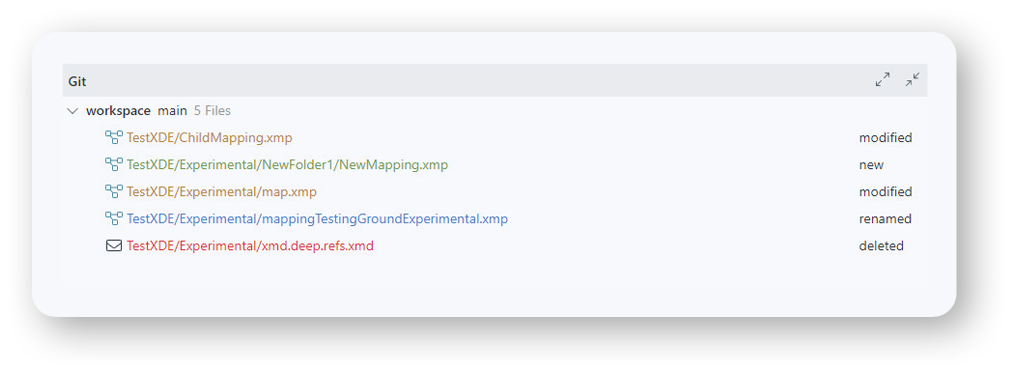
In git workspaces, the git status of documents is indicated by colors in the Workspace Explorer. Moreover, there’s a separate pane below the editors listing the modified documents.
File Source Adapter
It is now possible to configure several record separators for header, data, and trailer. The adapter will use the first separator it finds for the rest of the file. This allows e.g. to configure Windows and Linux line breaks (\r\n and \n) so that both variants of files can be processed with the same configuration.
FIX Adapters
Both server and client adapters support TLS v1.3.
Repository Destination Adapter
Delete statements for both fields and meta fields are supported in replace and merge modes.
WebService Bidirectional Client Adapter
The new property „Enable XA delivery mode“ allows to send messages to the server only when the XA transaction is committed.
WebService Server Adapter
The new property „Enable XA delivery mode“ allows to send response messages to the client only when the XA transaction is committed or rolled back. In case of a rollback, a generic SOAP fault message will be sent to the client with a configurable error message.
General
The new time specifier “%zn” in message definitions allows to parse and build date/time expressions where the time zone is always expressed as an offset, even if it’s zero, then generating “+00:00”. The feature is generic for all parsers and builders processing date/time fields. An important use case is the building of ISO 20022 messages as the “+00:00” is validated by some issuers.
CSV Parser
ISO 20022 Parser and Builder
Parser and Builder support a new SAA letter message definition where the /Letter/SAA group is used without revision. This simplifies the migration to newer SAA letter versions in x-gen mappings.
ISO 20022 Builder
There’s a new logic to split large camt.053 messages, now complying with Swift CBPR+ splitting rules.
JSON Parser
A new option allows to ignore unknown fields in JSON messages.
Repository PU
The Update mode “REPLACE” now locks the messages to be updated if the database allows row locking. The new Update mode “REPLACE SKIP LOCKED” additionally skips messages locked by another session if the database allows to skip locked messages. As a consequence, different “On hit” actions might be triggered when skipping locked messages.
Misc/Error
The “ErrorText” input port is now iterated. This allows to write several (different) error messages to the XPR log file with a single operator.
Download of Log Files, Traces, and Transaction Logs
New context menus in Drill Down and Monitoring as well as a separate dialog allow to download x-gen log files (including backup logs), trace files and transaction log files from the server in a zip file. The scope can be a process, a project, or a list of projects. The downloaded traces can be visualized in the XRD. New privileges xgen:trace_request and xgen:tranlog_request are required to download traces and transaction logs. The existing privilege xgen:log_file_requests controls the log file download. The feature is particularly useful in container environments where logs, traces and transaction logs might not be accessible.
Role Exclusion
For any role, a list of “Forbidden Roles” can be configured. If a user has that role, he/she may not also have any of the forbidden roles, otherwise the login of that user is denied. The initial setup of x-gen now defines roles “UserAdmin”, “RoleAdmin”, and “ProjectAdmin”. The “UserAdmin” role has “RoleAdmin” as forbidden role, i.e. user administrators cannot maintain roles and role administrators cannot maintain users. The initial “admin” user has the roles “ProjectAdmin” (in particular to start and stop projects, processes and flows) and “UserAdmin”. A new user “roleadmin” has only the role “RoleAdmin”. The initial setup clearly separates user administrators for role administrators. However, the concept is generic and can also be used in business applications, e.g. when a user is allowed to use functionality A, he/she may not use functionality B.
User Settings
A new main menu item “Application Settings” allows to manage the settings stored for x-gen frontend applications that use the new settings API in the Web SDK (see below). Settings can be viewed, deleted, as well as exported and imported, enabling to transfer and share settings. The privilege XGen-Admin:settings_management is required to see the menu item. Additionally, when deleting a user in the “Users” menu item, all settings stored for that user are deleted as well.
Alerts
The action type “SNMP” for alerts is no longer supported. SNMP alerts should be replaced by script based alerts.
Channel Manager Enhancements
The Channel Manager was improved in terms of stability and transaction recovery.
Enhanced Container Support
msgdefimp
Check of MIME Type When Uploading Files
A new profile parameter configures the allowed MIME types for files supposed to be uploaded. The MIME type of a file is determined by analyzing the file content.
XCI DownloadLogFilesRequest
This new request is used in the XWA feature to download log files, trace files and transaction log files.
In most of the sample projects, the port numbers have been changed to avoid port conflicts when running several sample projects simultaneously.
Support for ExtJS 7
All Ext JS components have been upgraded to version 7.
User Settings
The new “xgen.settings” API enables storing of application-specific settings in a standard x-gen repository available to all applications. The API supports various use cases but typically, settings are a list of key/value pairs that are stored for each user of an application. What the settings represent and what effect their values have depends on the application. After login, the settings of the user, as well as global or team defaults, are loaded and applied to the application components. Such settings may include the width and order of columns in each table, the state of toolbar checkboxes, whether collapsible panels are expanded by default, and more. Users may share settings, or team leaders may provide default settings which the users can customize. Additionally, applications can define custom settings a user can modify in a dialog, and for complex applications, settings may be grouped so they can be managed for each module separately.
Mapping Concept
There’s a new chapter on mappings in the Concepts book. It describes the different mapping types and how an output message is created based on an input message.
Frontend Development
The former guide for frontend development (aka “Cookbook”) has been updated and replaces the previous overview of the XCI Application Development book.
Reach out to your x-gen Support Team