
Insights
valantic Viewpoints
Current trends and technologies, analyzed from different perspectives.
Learn moreOur capabilities bring vision to life, blending strategy, creativity and technology to turn ideas into real impact.

Your market environment has a decisive impact on your digital challenges. We understand your unique needs and develop solutions that deliver real impact.
From studies and blogs to webinars, podcasts, and exclusive events – discover ideas, trends, and expert knowledge for your digital future.

With in-depth know-how, clear values, and a vibrant corporate culture, we shape digital transformations that make a real impact.

Are you looking for a professional environment with challenging digital projects for renowned clients? You're in the right place.
This document describes in short most of the new features that are included in x-gen release 4.16. For more comprehensive explanations and the list of bug fixes, please refer to the Release Notes.

Databases
Login: The login dialog has a new option to permanently disable the login. If you don’t use XDE, the login is useless. (XGEN-8018)
Start XDE: In the “Tools” menu, there’s an option to start the XDE. (XGEN-7948)
Refactoring of Message Definitions: This new feature allows to restructure message definitions, e.g. to rename fields or to move fields into groups, and to semi-automatically adapt all documents referencing FQNs of that message definition to their new value. The structural modifications are done in a copy of the message definition in question, then a wizard guides through the steps to use the modified message definition and the changed FQNs instead of the old ones in all places. (XGEN-8052)
Web Service Migration Wizard: In x-gen 4.16, a new framework for SOAP based Web Services is used (see details in Adapter chapter). Newly created Web Services are based on the new framework. Existing Web Services can still be executed, however, they cannot be edited anymore. A migration wizard in XRD helps to migrate existing Web Services to the new structure, using the new refactoring feature, see above. (XGEN-8482)
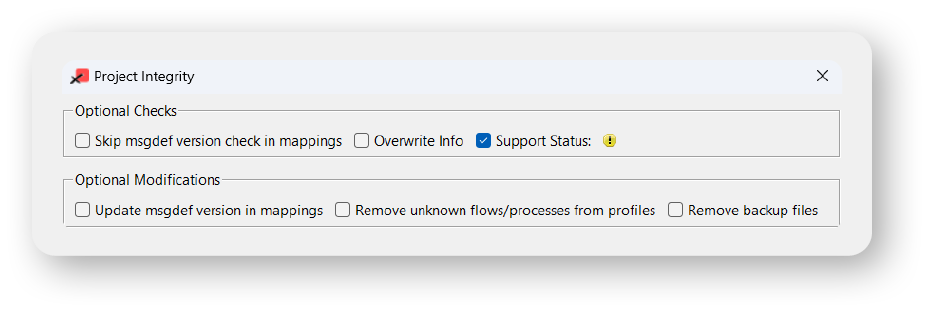
Project Integrity: On top of the Project Integrity dialog, there are now two sections to distinguish between options for reporting and those that might modify or remove documents. (XGEN-8254)
Meta Field Search: The Meta Field Search dialog now allows to search for meta field names with wildcards. Moreover, it is possible to search only for places where meta fields are set, or where they’re used. (XGEN-4206, XGEN-7806)
Profile Parameter Search: Searching for the usage of profile parameters is now also possible via context menu in the Property sidebar. (XGEN-8229)
Git Improvements
Attribute Sets: Attribute sets are now standard x-gen files with a file ID and an own editor (file extension is .xas). User-defined attribute sets can be created anywhere in a project and thus are available in the workspace (so far, they were only available in the local XRD installation). They can be versioned, duplicated, overwritten, reported as referenced etc., like any other document type. System-defined attribute sets were moved from lib/templates to the system workspace. Existing user-defined attribute sets can be imported to a new attribute set file in the workspace. (XGEN-7250)
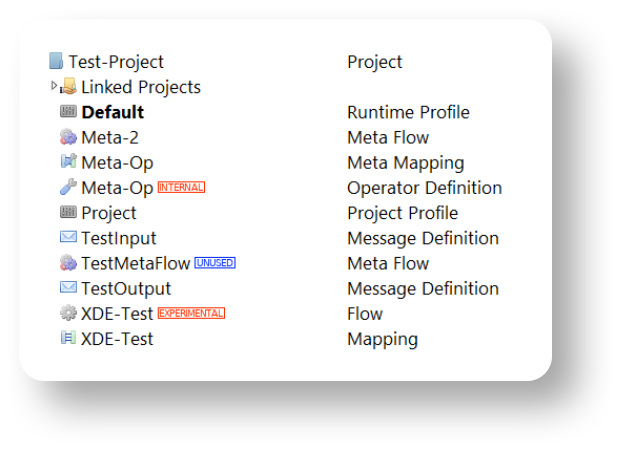
Support Status in All Document Types: The support status can now be set for all kinds of x-gen documents, e.g. message definitions, flows, mappings, etc. In the Project and Object Sidebars of XRD, documents with a support status other than “Released” are marked. Several dialogs, e.g. the file selection dialog, show the support status of the available files. (XGEN-4575)
Project Sidebar: Documents not referenced by other documents are marked as unused. (XGEN-8096)
Trust Management: The trust management (a variant of the OpenSSL “c_rehash”) is no longer supported. It was removed from XRD. (XGEN-7605)
3.1 Application Framework
The User menu shows the current user name. An About box is available, displaying the current x-gen version, the instance name (defined in config/ini/xgen.ini), and a link to the 3rd party license information. The x-gen license content can be displayed.
The workspace folder name is displayed on top of Workspace Explorer. The instance name is shown in the Browser title.
3.2 Flow Editor
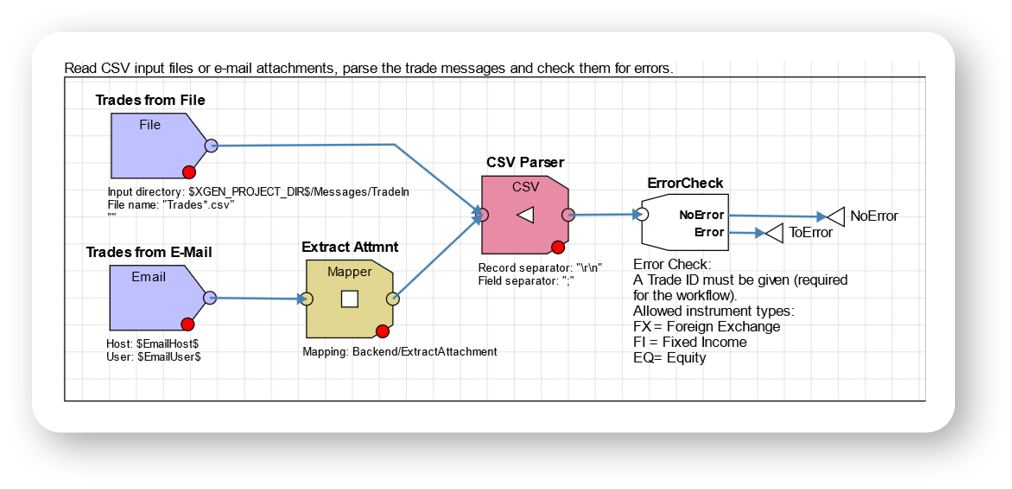
The new Flow Editor is ready to use. Flows can be created in the Workspace Explorer, and a double-click opens a flow in the Flow Editor. Most of the look & feel of the Flow Editor is known from the XRD. However, many features known from the Mapping Editor in XDE are available for flows as well, such as alignment modes, undo & redo, improved anchor handling, or mini map. General properties of the flow such as description or view options are visible and editable in the Property Editor.
Flow items such as adapters, processing units or connectors can be added to the flow by drag & drop from the Item Explorer. A context menu is available on flow items with the most important functionalities. Properties of flow items are configurable for almost all property types in the Property Editor, including setting them to a profile parameter or meta field.
It is possible to drag and drop mappings, validation mappings, meta flows and workflows from the Item Explorer into a flow. This will add a corresponding PU (mapper PU, validator PU, meta flow PU, workflow PU) and associate it with the dragged item.
The Problem View shows errors and warnings related to the flow.
3.3 Meta Flow Editor
The new Meta Flow editor is available. Meta Flows can be created in the Workspace Explorer, and a double-click opens the meta flow in the Meta Flow Editor.
Most of the look & feel of the Meta Flow Editor is known from the XRD, and the handling is virtually the same as in the Flow Editor of XDE. Accordingly, the features known from the Mapping Editor in XDE are available for meta flows as well, such as alignment modes, undo & redo, improved anchor handling, or mini map. General properties of the meta flow such as description or view options are visible and editable in the Property Editor. The meta properties (the properties that are configurable in the meta flow PU) can be edited within the editor area. The Problem View shows errors and warnings related to the meta flow.
3.4 Message Definition Editor
In the Message Definition Editor, the XDE standard search via Search symbol or slash key (/) is available to search for fields and groups. Privileges can be assigned and removed to/from message definitions. The assignment of these privileges to specific fields or groups, overwriting the default, works similar to XRD.
Field and group attributes can be edited inline or in the Property Editor, including privileges and those defined in Attribute Sets.
References to other message definitions via profile parameter can be dragged and dropped into a message definition from the Item Explorer, similar to references to other message definitions or dictionaries.
3.5 XAD Integration
The x-gen Application Designer is integrated into XDE. Documents edited by XAD (such as an application or a GridForm) can be created in the Workspace Explorer. When opening such a file in XDE, in fact an XAD instance is started within XDE. Thus, the look & feel is the same as in stand-alone XAD. The general properties of the documents, such as description or privileges, are editable in the Property Editor of XDE.
Adapter Error Handling: This new feature allows to limit the number of retries to process a message if processing of that message has failed in a flow. If the flow runs in 2-phase commit mode and the “On error” property of the failing flow object (e.g. a parser) is set to “ContinueButAbort” (initiating a rollback), some source adapters allow to configure the maximum number of retries to process that message (property “Max. processing attempts”). The following source adapters support the feature:
(XGEN-8065)
JMS Adapter: The JMS adapter requires specific message definitions that are delivered in system/XGen-Misc/JMS. So far, these message definitions had to be created by the application developer. (XGEN-7864)
Repository Source Adapter: The adapter supports dynamic polling, similar to the SQL source adapter. (XGEN-2826) REST Client Adapter: The adapter supports a “Transaction batch size”. (XGEN-8438)
REST Server Adapter: The adapter provides request info in output. (XGEN-8468) Web Service Adapters: All SOAP based Web Service components are now based on the framework “Apache CXF”. They support all features as the previous implementation based on “Apache Axis2”. Among others, relevant enhancements are
Existing Web Service components are marked as “Deprecated”, however, they are still usable and supported. To use the new framework, they can be migrated in XRD (see description in XRD chapter). (XGEN-4563)
Formatting Decimal Places in Date/Time Values: Several parsers and builders support the new format specifier for fractions of seconds “%fs”, with specifying the number of decimal places. (XGEN-8284)
Avro Parser: The Avro Parser allows to process messages based on different versions of the Avro schemas and to convert them to the existing message definition. (XGEN-8174)
Branch: The default of property “On Evaluation Error” has been changed from “Raise Error” to “Treat as False”. Existing branches are not affected. (XGEN-8483)
GREE_Engine PU: The Generic Rule Editor and Evaluator PU has now support status “Released”. It is fully supported and documented. (XGEN-8243)
ISO20022 Parser: The new message definition algorithm allows to optionally choose a message definition depending on the content of a field in the business application header. This is used e.g. in CBPR+. (XGEN-8240)
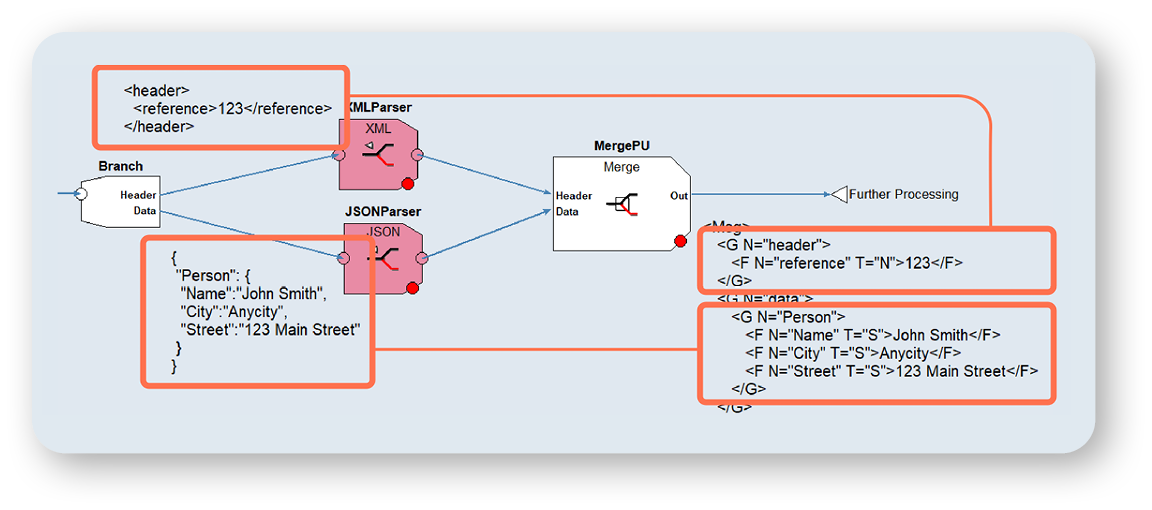
Merge PU: The new Merge PU combines several messages into a single message that have been previously split in a flow. When all incoming messages of the same source have arrived, the PU generates the merged output message. The exact merge behavior is configurable via properties. The PU allows e.g. to process “mixed” message content and to merge the partial messages into one message as shown in the example. (XGEN-3120)
Meta Flows: Error and Failed Connectors are supported in meta flows. This allows meta flows to take care of error handling within the meta flow. In addition, meta flows can provide error messages to the error port of the parent meta flow PU through a specific Error output port. If the parent flow wants to take care of error handling, there are properties to configure the meta flow PU not to use the Error and/or Failed connectors of the invoked meta flow. (XGEN-8275)
MsgInserter PU: The new PU can be used to uniquely insert a message into a message repository when the flow runs in parallel and competing inserts take place. (XGEN-7904)
Repository PU: The PU optionally allows to read and provide messages without executing any statement. (XGEN-7634)
RFH2 Parser: The parser additionally provides the payload data of an RFH2 message. (XGEN-8333)
RFH2 Builder: New builder to create RFH2 messages with header (including data blocks) and payload data. (XGEN-4453)
Tokenizer PU: The Tokenizer PU has now support status “Released”. It is fully supported and documented. (XGEN-8243)
Web Service PU: The Web Service PU is now based on the framework “Apache CXF”. For details regarding new features and migration, see the description of the Web Service adapter. (XGEN-4563)
XML Parser and Builder: The XML PU supports abstract XML. (XGEN-2039)
Python Operators: x-gen now supports operators written in the Python programming language. An externally provided Python installation in version 3.13t is required. A sample project shows how to use Python operators. (XGEN-3754)
Database/ModifyRepository: There’s a new property “Execution control port”, similar to other database operators. If the corresponding input port has NO VALUE, the operator won’t be executed. (XGEN-8241)
Database/RepositoryOperator: As the operator returns one record only, it now limits the fetch size to 1 to improve performance. (XGEN-7987)
Financial/AnalyzeIBAN and CreateIBAN: For both operators, a custom IBAN configuration file can be configured that specifies additional IBAN countries. This might be necessary if IBANs of non-official IBAN countries must be processed. (XGEN-8399)
Introspection/VolumeCounter: The new operator counts business objects (such as payments or investigation cases) for a specific time interval and stores the volume data in a forgery-proof message repository. For each business object to be counted by the operator, a separate token is required in the x-gen license file. The token defines a key (for the business objects), a time interval (day, week, or month) and a limit. The application is responsible to report used volumes or to deal with exceeded limits. The message repository must be created with a new “msgreptool” command line option (see Command Line Tool chapter). (XGEN-8427)
Misc/CommandsControl, ValueList and WidgetControl: These operators now have a support status “Released”. They are fully supported and documented. (XGEN-8243) Repeat/RemoveElement: The “List” input port and “Out” output port are now multi ports, allowing to add additional ports and thus to process several lists in a single operator. (XGEN-7495)
Repeat/RemoveElement: The “List” input port and “Out” output port are now multi ports, allowing to add additional ports and thus to process several lists in a single operator. (XGEN-7495)
RFH2/ParseRFH2: The operator additionally provides the payload data of an RFH2 message. (XGEN-8333)
RFH2/BuildRFH2: The new operator creates RFH2 messages with header (including data blocks) and payload data. (XGEN-4453)
Security/Encrypt and Decrypt: The operators were renamed (formerly Encode/Decode), as they do en-/decryption, not en-/decoding. This change is compatible as the file IDs of the operators didn’t change. (XGEN-8216)
Security/GenerateJWT and ValJWT: In addition to JWT processing, the operators additionally support the generation/validation of JSON Web Signatures (JWS). (XGEN-8467)
String/Format: The operator additionally supports to center a string and to convert a string to hexadecimal. (XGEN-8040)
String/Split: There’s a new output port providing the remainder when there are not enough output ports for the split strings. (XGEN-7709)
Web Service Operators: New Web Service operators are based on the framework “Apache CXF”. For details regarding new features and migration, see the description of the Web Service adapter. (XGEN-4563)
In-Memory Repositories: The multi-threaded access to in-memory message repositories was improved. In this context, the record locking mechanism was enhanced to allow simultaneous access of the same message repository (e.g. in a workflow) in two different flows running in the same process. (XGEN-7435)
Message Defition Import Tools: In the context of attribute sets being a new standard file type in x-gen (see XRD chapter), all tools to import messages definitions now use the respective system attribute sets. (XGEN-7669)
Import from JSON Schema: The message definition import from JSON schemas now supports the “$ref”/”$defs” keywords. (XGEN-6938)
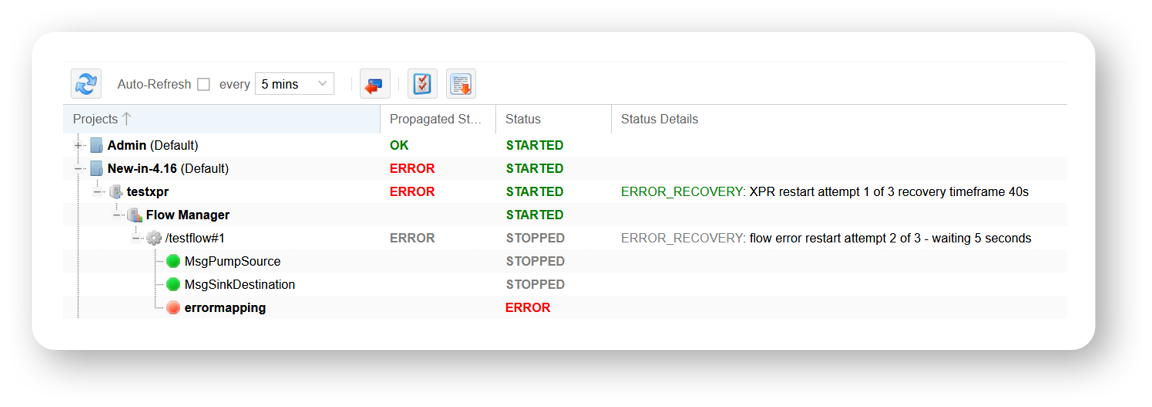
Drill Down: There’s a new column “Status Details” to display more information for the current status of processes and flows. For instance, an automatic process restart, triggered by a previous error, is visible. (XGEN-4308)
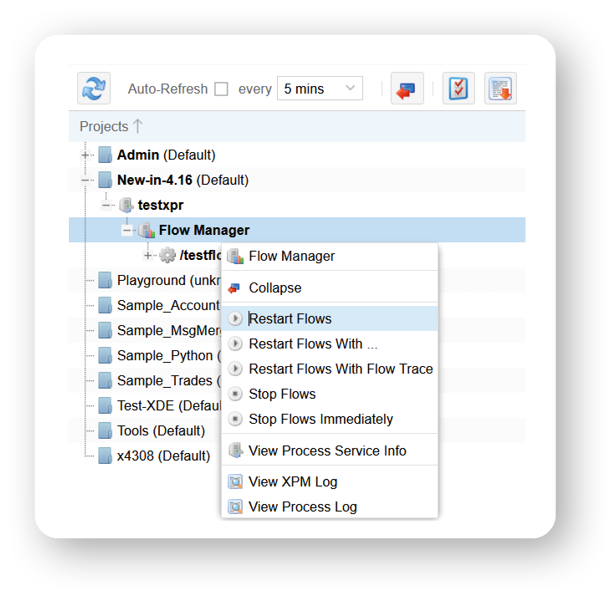
Drill Down / Monitoring: There’s a new option to restart all currently running flows of a process without having to restart the process itself. (XGEN-7332)
Anti-CSRF Token: To improve security, the usage of anti-CSRF token is enabled by default for the XWA. (XGEN-8032)
Support Status in Profiles: In the default of profile parameter “x-gen support status warning”, the value “Internal” was removed, thus the new default is “Beta, Deprecated”. Background of this change is that several operators and other objects used in x-gen Modules (XGM) have support status “Internal”, and thus produced many unwanted warnings in the XPR logs so far. In this context, the support status of several objects was changed to “Internal”. (XGEN-8242)
Log Files: The process id (PID) was added in the header of XPR and XPM log files. (XGEN-8459)
Profile Parameter for Event Manager: The so far deprecated profile parameter “Event manager role” was removed. Profiles configuring this parameter must be updated manually. (XGEN-8209)
integritycheck: The Project Integrity Check is now available as command line tool. It can be used e.g. in packaging scripts to avoid packaging projects with errors. (XGEN-7579, XGEN-7837)
msgdefimp: The tool supports abstract XML when importing message definitions from XSDs. (XGEN-4694)
msgreptool: In the context of volume based licensing (see operator Introspection/ VolumeCounter), there are two new options in the msgreptool. “vc-record-init” creates a master record for a license token key, which is required to guarantee the integrity of the volume records that will be created by the VolumeCounter operator. “vc-record-check” provides the current volume count for a key and a time interval. (XGEN-8486)
xgenadmin: There’s a new option “-reason” for the “status” command, providing more information for the current status of processes and flows, similar to what the XWA displays (see XWA chapter). (XGEN-4308)
xprestjwt: The tool now allows to create a JWT token with header claims. (XGEN-7486)
xsltproc: The xsltproc command line tool applies XSLT stylesheets to XML documents. It is provided with x-gen in the “unsupported” folder. (XGEN-8466)
Forwarding XCI Requests To a Channel: All XCI request and response messages can be forwarded to a flow channel (and further processed in a flow), e.g. for auditing purposes. Optionally, certain requests and responses can be configured to be forwarded. Passwords are always masked in the forwarded messages. A lifetime for the forwarded messages can be configured. (XGEN-7847, XGEN-8166, XGEN-8256)
FileUploadRequest: The FileUploadRequest optionally allows to overwrite existing files. (XGEN-7651)
Client Tracing: It is no longer possible to start client tracing with the LoginRequest. Instead, the SetTraceModeRequest allows to turn on/off tracing for a single user. (XGEN-7211)
Displaying Deleted and Rejected Records of Audit Repositories: A new functionality has been introduced to improve visibility of audit data, specifically concerning deleted and rejected records. The feature is available in Entity Management, OrgUnit Management, Users and Roles Management, Holiday Calendar and Business Hours (XGM-1409, XGM-1410, XGM-1411, XGM-1416, XGM-1417).
Configuration of Sample Frontend Processes: To improve security, the configuration of frontend processes has been strengthened across a range of XGM and sample projects. Along with this, the outdated Event Manager Role configuration of the sample projects has been removed and optimized. (XGM-1148, XGM-1460) 1
New “ParameterSet” Field in Results: To address limitations related to rule name lengths in databases, a new field titled “ParameterSet” has been introduced to the “Results” section, which will distinctly capture the number of the parameter set used during rule evaluation. (XGM-1447)
Direct Database Execution of Default Filters: To further enhance system performance, optimizations as direct database checks or improved filter syntax have been made. (XGM-1109)
Enhanced Data Access Control: The Query Builder has been enhanced to improve user access control within hierarchical team structures. (XGM-1342, XGM-1463)
Usability Improvements: Several updates are crafted to provide an intuitive search management experience within the Query Builder. (XGM-1451)
Composite Fields for Enhanced Query Flexibility: The concept of “composite fields” has been introduced within the Query Builder to enhance query flexibility and precision. This addition provides users with powerful tools for managing complex queries, improving both the user experience and the accuracy of data retrieval operations. (XGM-1458)
Application Trace Mode: The x-gen Application Designer (XAD) now offers an enhanced Application Trace Mode, allowing users to utilize the XAD embedded debugger (Trace View) in runtime outside of the XAD environment. In addition, a new trace import functionality has been added to the Trace Viewer, facilitating the import and analysis of previously exported trace data. (XGM-1452)
GridForm Handlers Support for “toggleedit” Event: Customizability within the GridForm has been extended. Users can now execute custom commands after the “toggleedit” action. (XGM1457)
Integration in XDE: See chapter 3.5.
Contact us
Feature Overview 4.15
The latest x-gen release introduces enhanced vulnerability checks, updates to the XDE Definition Editor, improved log file exchange and XRD git capabilities, and new backend features. It also delivers product maintenance optimizations, web application…